
Convert monthly CSV exports to readable JSON and ZIP them
An operations system exports monthly orders as CSV, but a developer needs JSON fixtures. Reformatting files by hand creates chances to drop leading zeroes, change a value or forget one month. A repeatable conversion keeps the handoff consistent.

When this helps
Use this when each CSV has a header row and you need a separate JSON array for each source file. The workflow packages the files together; it does not merge months or reconcile orders across files.
Prepare your files
The example has two CSV files with order_id, customer and total columns. Each contains two fictional orders. Keep column names consistent and export as UTF-8 text before conversion.
Follow the steps
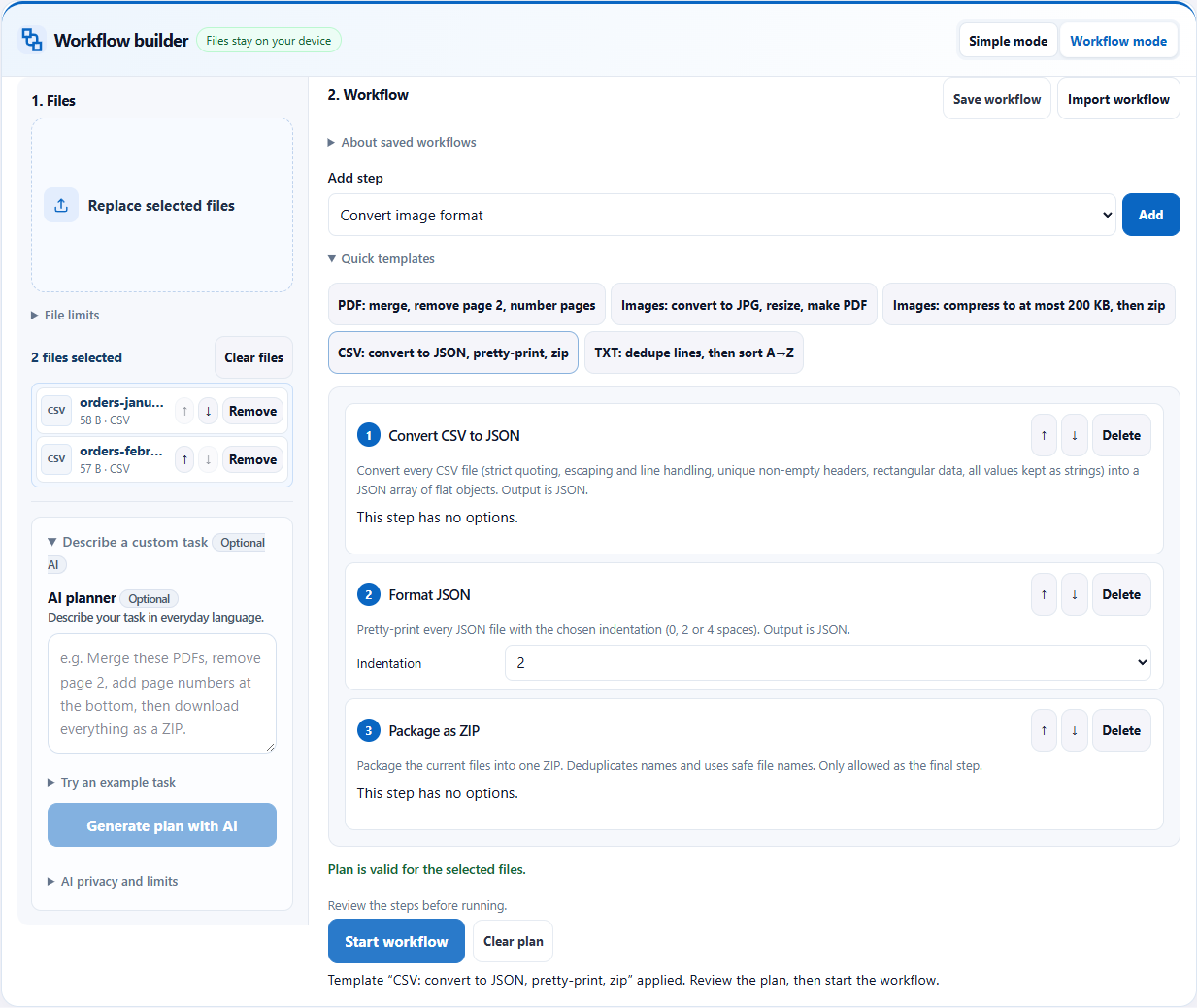
- Open the Workbench and select both CSV files. The list should show the two months you intend to hand off.
- In Workflow mode, expand Quick templates and choose “CSV: convert to JSON, pretty-print, zip”, or import the recipe below.
- Review CSV to JSON, JSON formatting with two-space indentation, and ZIP packaging. Each input file remains a separate data output.
- Run the workflow, download the ZIP and extract it.
- Open both JSON files. Ask the recipient whether they expect strings, numbers, a JSON array or another schema before using the files in an integration.
See the full workflow and parameters
Check before handing off
- The ZIP should contain two JSON files, each with two objects for this sample.
- Check that order_id “001” retains its leading zeroes and total “125.50” remains unchanged.
- Confirm the keys match the CSV header row and the indentation is readable. Then validate the receiving application’s required types separately.
What the example produced
Two CSV samples produced two JSON files inside a ZIP. Each contained two records; checks confirmed that “001” and “125.50” were retained as strings.
Download the verified example result →
Things to watch
- The example preserves cell values as strings. It does not infer numbers, dates, currency or booleans. A recipient who expects numeric totals needs an explicit type-conversion step elsewhere.
- This workflow converts CSV files, not Excel workbooks with formulas, styles or multiple sheets. Export the needed sheet to CSV first.
- It does not deduplicate across months, combine datasets or check business rules. Check unusual delimiters, quoting, empty headers and duplicate column names with a small sample first.
Try it with the sample
Download the sample files, select them in the Workbench, switch to Workflow mode and import the workflow JSON. Review the steps before starting.
Download sample files
Or describe the task
Convert each CSV file to JSON, format the JSON with two-space indentation, then package all outputs into a ZIP.Templates and imported workflows do not need AI. AI planning sends your instruction and file aliases, formats, sizes and inspection metadata to the server; file contents, real filenames and paths stay on your device. Review generated steps and leave sensitive information out of the instruction.
Related tools
Screenshots and results come from actual Workbench runs on October 12, 2026, using fictional sample data. They demonstrate these examples; check your own outputs before handing them off.