
Save a file-processing workflow and reuse it next week
Weekly housekeeping often involves the same operations on new files. Once a workflow works, save its steps instead of rebuilding the sequence or asking AI to draft the same plan every time.

When this helps
A saved recipe is useful for recurring supplier-list cleanup, image preparation or standard PDF assembly. It gives your colleague a starting point they can inspect; it is not a scheduled job and will not run by itself.
Prepare your files
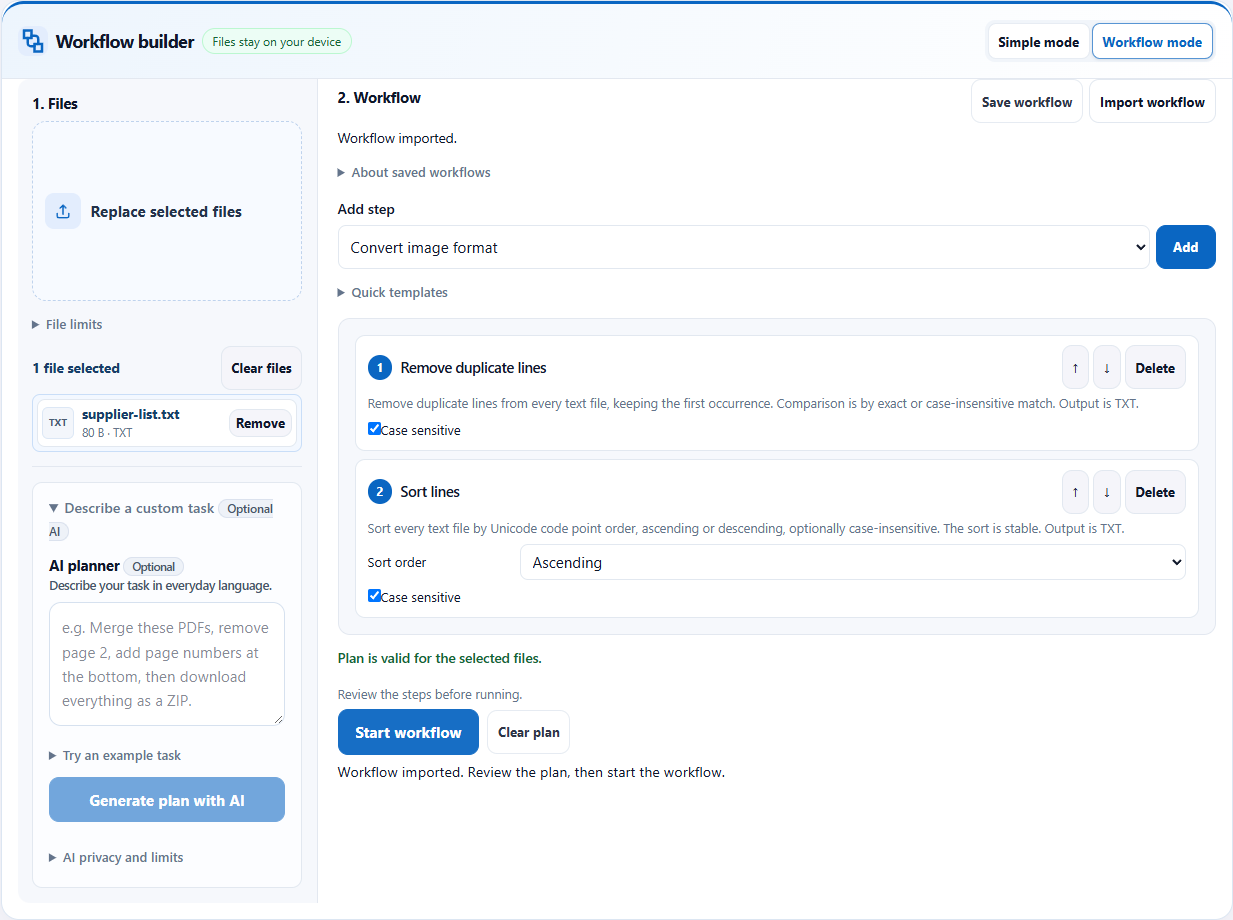
This example reuses the TXT duplicate-removal and sorting workflow. Start with a tested plan, or download the supplied recipe. Keep the recipe separate from the source files you intend to process.
Follow the steps
- Build and test a workflow in Workflow mode. Inspect the result before deciding that its parameters are suitable for reuse.
- Choose Save workflow. The browser downloads toolmink-workflow.json. Rename your saved copy descriptively, such as supplier-list-cleanup.json.
- Next time, open the Workbench and choose the new source files. Choosing files replaces the old list.
- Choose Workflow mode and Import workflow, then select the saved JSON. Check the imported steps and parameters against this week’s files.
- Choose Start workflow and download the new results. You remain in control of when the recipe runs.
See the full workflow and parameters
Check before handing off
- The sample recipe contains duplicate removal followed by ascending sorting. Check that these steps appear after import.
- Run the supplied sample: five lines should become the three unique supplier names in order.
- If the imported recipe does not fit the selected formats, correct the input or plan rather than assuming it has executed.
What the example produced
The saved recipe was imported after a fresh navigation and executed on newly selected sample text. Its output matched the expected three unique lines, with no AI planning request.
Download the verified example result →
Things to watch
- A recipe saves steps and parameters, not original filenames, file contents, instructions or previous results. It is not a backup of your work.
- Parameters can include text you entered for a watermark or comparison. Review the JSON before sharing a recipe with someone else.
- A recipe is not a timer, folder watcher or unattended automation. The browser must stay open while processing, and you must select files and start each run.
- Future changes to supported operations may affect an older recipe. Review imported steps before processing an important batch.
Try it with the sample
Download the sample files, select them in the Workbench, switch to Workflow mode and import the workflow JSON. Review the steps before starting.
Download sample files
Or describe the task
Remove exact duplicate lines from each TXT file, then sort the remaining lines in ascending order.Templates and imported workflows do not need AI. AI planning sends your instruction and file aliases, formats, sizes and inspection metadata to the server; file contents, real filenames and paths stay on your device. Review generated steps and leave sensitive information out of the instruction.
Related tools
Screenshots and results come from actual Workbench runs on October 12, 2026, using fictional sample data. They demonstrate these examples; check your own outputs before handing them off.